
Microsoft Surface Hub 2S: New Features to Discover
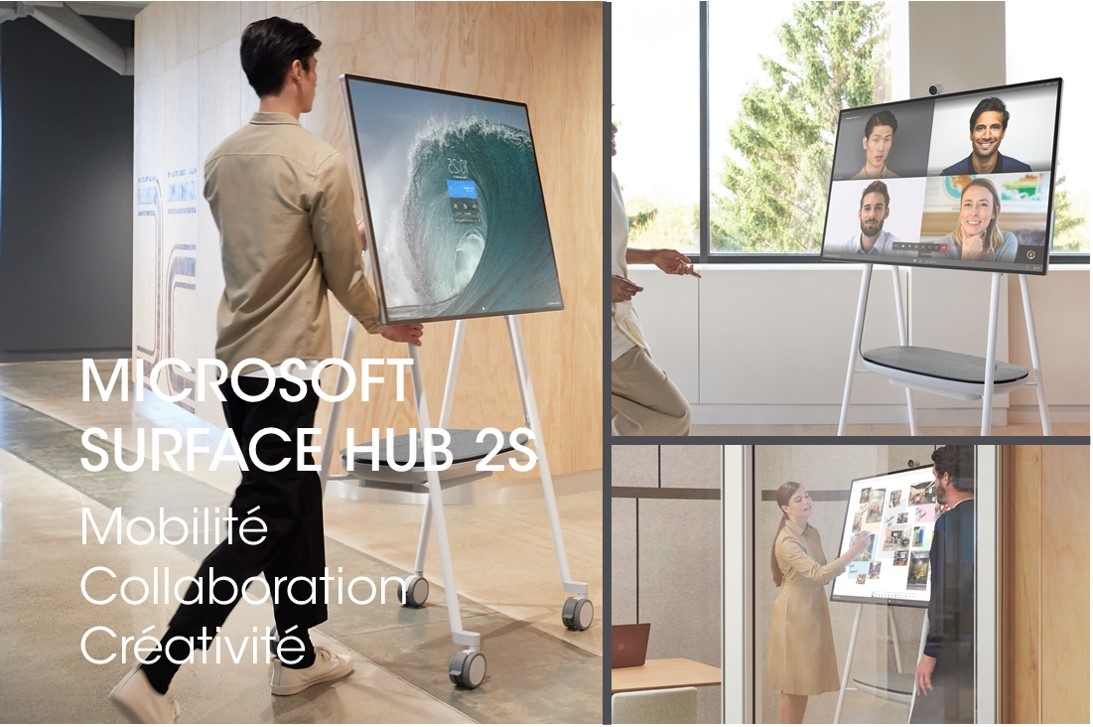
Microsoft Surface Hub 2S, the mobile collaboration tool
Today, the Microsoft Surface Hub 2S has taken the business world by storm thanks to its sleek design and exceptional new features. Compared to Version 1, the Microsoft Surface Hub 2S now features a slimmer bezel, a stand on wheels, and a built-in battery. Users now have an ideal collaborative tool for meeting rooms, open-plan offices, or informal spaces. It also complements the audiovisual equipment in conference rooms, boardrooms, auditoriums, and lecture halls.
Audio and video equipment that enhances remote teamwork
In response to growing demand from businesses for videoconferencing solutions, Microsoft has equipped the Surface Hub 2S with a USB-C-powered 4K camera. This camera can be easily detached from its mount, ensuring it remains secure when the device is moved around the office.
Similarly, the far-field microphones, the clarity of the speakers, and the 4K+ display were specifically designed for both audio and video conferencing. As a result, these high-definition technologies help make collaborative work more efficient.
Features that facilitate collaboration and brainstorming
Working together on the same project at the same time, adding annotations, seeing and hearing each other, and sharing documents has never been easier! But the Microsoft Surface Hub 2S comes with other interesting and practical features as well. Here are three that you’ll quickly adopt and won’t be able to live without.
Enhance drawings and writing with the Surface Hub 2S’s Whiteboard feature
When using the pen, the built-in Whiteboard feature lets you enhance your drawings, diagrams, or text. Circle them, tap the magic wand, and instantly, lines straighten, handwriting becomes more legible, and drawings are improved. This makes sharing your ideas simpler and more effective.
100 touch points
Unlike other interactive whiteboards, the Microsoft Surface Hub 2S is the only one that supports up to 100 touch points at once.
This allows users to edit any element on the screen simultaneously. Now you can easily share new ideas or present them more effectively to your colleagues.
This feature is particularly useful for design teams working on large-format images.
It’s also helpful when multiple presenters are taking notes during a brainstorming session.
Project, edit, record, and share content wirelessly
With the Microsoft Surface Hub 2S, you no longer have to worry about an HDMI cable. You can now connect wirelessly from any Windows 10 device using Miracast. Finally, each participant can sign in to their own work account and access, edit, and save their documents on OneDrive in real time.
In conclusion, with the Microsoft Surface Hub 2S, businesses now have a comprehensive platform for collaborative work: an interactive and intuitive whiteboard, native Teams integration, and a suite of apps. Add to that its portability, sleek design, a 50% increase in graphics performance, and 4.7 times more pixels.
Microsoft Partner Gold
Videlio is a Microsoft Gold Partner for Windows and Devices, certified for:
Messaging, Cloud platform, Cloud productivity, Collaboration & content, Communications, Windows & devices, Small & Midmarket cloud solutions
Videlio, a technology partner for businesses and government agencies
Videlio assists you in designing your collaborative space projects. In other words, Videlio advises you on selecting audiovisual solutions and then handles the deployment and installation of audio and video equipment. Our teams also provide maintenance and technical support.
And regardless of the type of space you have (informal spaces, huddle rooms, meeting rooms, training rooms, boardrooms, auditoriums, etc.), the Videlio teams support you in managing change and adopting the new collaborative workflows offered by the Microsoft Surface Hub 2S.